
Introduction
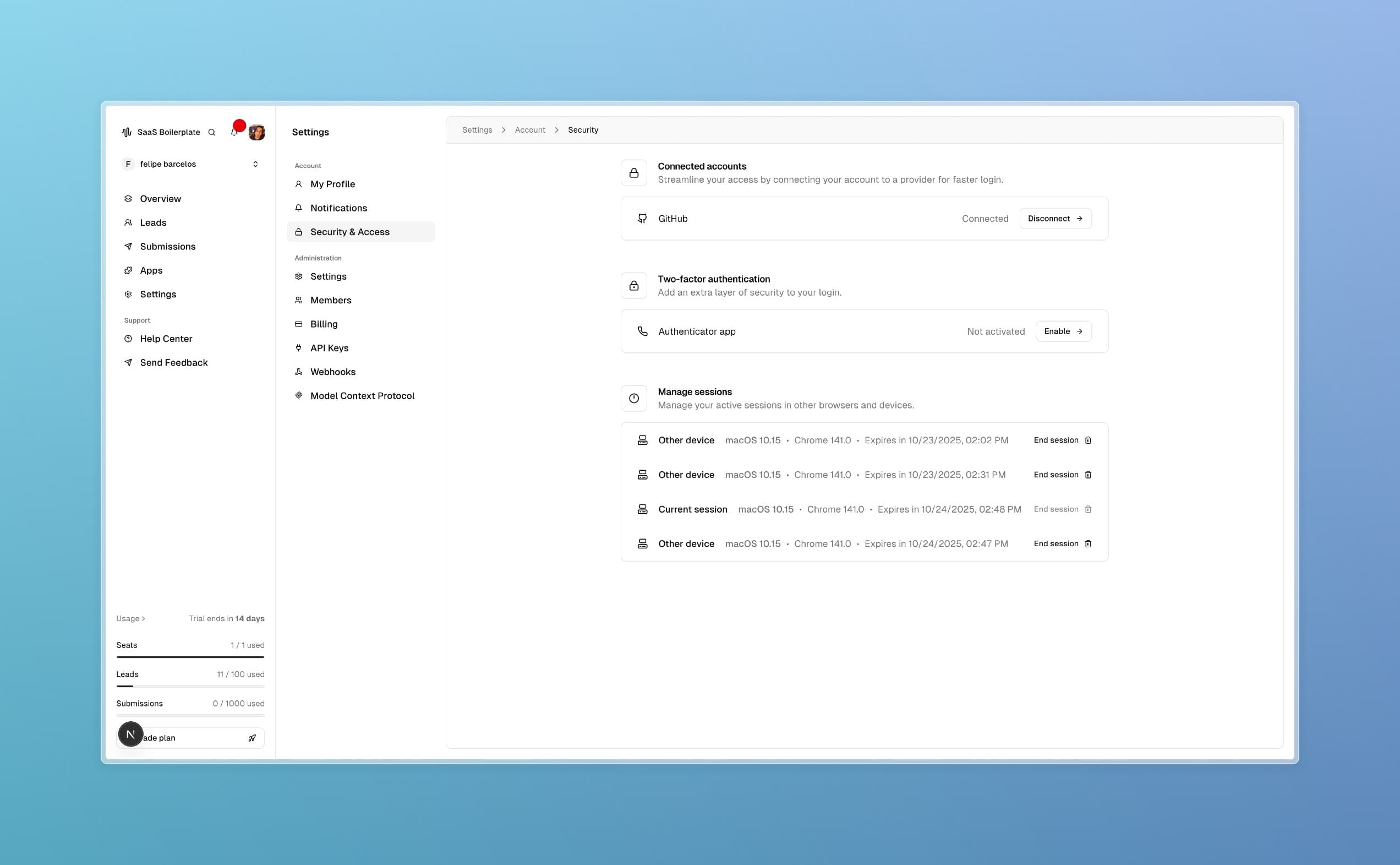
The Security & Access page is your control center for account protection. Here, you can enable two-factor authentication, connect external accounts for easier login, and manage active sessions. By the end of this guide, your account will be more secure and easier to manage.
Tip
Prerequisites
- Access to the SaaS Boilerplate dashboard
- A compatible device for 2FA setup (smartphone with authenticator app)
- External accounts (Google, GitHub, etc.) if you want to connect them
Core Concepts
Two-Factor Authentication (2FA)
Adds an extra security layer by requiring a code from your phone in addition to your password.
Connected Accounts
Link external services like Google or GitHub for single sign-on, making login faster and more secure.
Session Management
View and control all devices and browsers currently logged into your account.
Step-by-Step Guide
Access Security Settings
Navigate to Settings > Account > Security & Access in the dashboard.
Connect External Accounts
Click "Connect" next to supported providers (Google, GitHub, Microsoft) and follow the authorization prompts.
Enable Two-Factor Authentication
Click "Enable 2FA", choose your method (authenticator app or SMS), scan the QR code, and enter the verification code.
Manage Sessions
Review the list of active sessions, and click "End Session" for any you don't recognize or want to terminate.
Troubleshooting
Best Practices
Read More